Showing posts with label effect. Show all posts

Tuesday, April 30, 2013

Lightroom 4: How to add "matte" effect

Hello feathered friends!

We recently stumbled upon a fabulous editing shortcut that we wish to share with fellow photogs. As many of you know, the "matte" effect has become insanely popular in the portrait photography field, & all of us at Full Feather Photography have been captivated by the beautiful dream-like look it adds to images.  

If you are a Lightroom 4 user, & are seeking a way to apply this fairy-tale approach to your portraits, we highly recommend that you check out the "LR4 Matte" preset offered from Mandy Peltier Photo.  

Hover your mouse over the following example photos to see some before & after shots:


Talk about a timesaver! Apply the preset & bada-bing-bada-boom, it's transformed.

Oh, and did we mention that by purchasing this preset, you will be helping out a great cause? The Peltier family is hoping to adopt two children from Poland & the proceeds from their sales are helping to fund this cause.  They have many more items up for grabs, including Facebook Covers, digital prints & more presets.  You can see more of their awesome story & fund-raising efforts on Facebook, or if you would like to make a direct donation to this fund, you may do so HERE.

Please join with Full Feather Photography in wishing them many blessings in their adoption journey!


Wednesday, January 2, 2013

How to add HDR effect to a photo with Lightroom 4

Please click here to watch my: VIDEO TUTORIAL

Below is a quick & easy editing method I tested in Lightroom 4, which renders somewhat of an HDR effect.  This sample image was taken with my Canon Rebel T2i & fixed "nifty 50" lens:
ISO 100 ~ 50mm ~ f/4.0 ~ 1/160 sec
As you can see, it's over exposed and dull looking.

With a few quick tweaks in Lightroom 4, 

 
we end up here:

I wanted to bring out the red of the barn, so I then increased the Red saturation to +15 with a luminosity of +20.  I reduced the Green to -15 saturation & -60 luminosity & also adjusted the tone of the green to +20 to take away some of the "yellowish" tone.


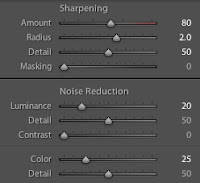
I made some further adjustments to the sharpness & noise reduction:
Finally, I added a slight vignette around the entire photo, & a graduated filter to darken the sky.  I did just a few last minute brushes increasing the clarity on the barn wood.

For someone working only with Lightroom 4, I was pleased with the end result.  I look forward to testing this out on some more photos soon, particularly on some of Oklahoma's incredible sunsets.